Showing posts with label Top Tablets. Show all posts

Thursday, 10 April 2014

Lenovo Ideapad A10 For a price tag of Rs.19,990

What should your second laptop be, the one you use for portable computing? So far, the options seemed limited to Windows netbooks and the new line of Google’s Chromebooks. But Lenovo has a new contender in mind: the Android-toting Ideapad A10.

Specs: 10.1″ IPS touchscreen (1366×768 px resolution) | 1.6GHz quad-core Rockchip RK3188 Cortex-A9 processor | 1GB RAM | 16GB internal memory, microSD up to 64GB | VGA webcam | mini-HDMI, 2xUSB 3.0, microUSB ports | Wi-Fi 802.11 b/g/n, Bluetooth 4.0 | 4400mAh battery | Android 4.2 Jelly Bean with Lenovo Customization

Price: Rs 19,990

Design: The Ideapad A10 is a budget laptop and feels like one. The hinge is a little too tough, the plastic body recesses inside when you press it hard, and it’s overall chunky. That said, it’s definitely light and easy to carry around. One aspect that I really liked is that it uses a standard microUSB port to charge instead of a laptop adapter, which means you can use almost any mobi
le charger to juice up. Plus, there’s a mini-HDMI out and two standard USB ports for further connectivity

Performance: Android isn’t a great laptop OS, but in regular usage, you won’t find it lacking in performance. Whether you are browsing the Web or writing a quick proposal in a document, the A10 performs admirably. The only time it starts stuttering is when you ask it to multi-task extensively. Switch on a music player, fire up a browser, and try talking on a chat program at the same time—with frequent back-and-forth between the apps, the A10 will start lagging.

Connectivity: The Ideapad A10 worked with Wi-Fi perfectly well, but we didn’t have the same

ShArE It On FaCeBoOk

Wednesday, 2 April 2014

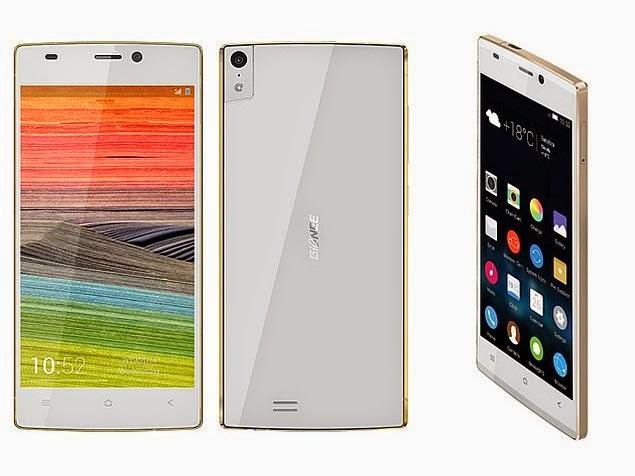
The Gionee Elife S5.5 Slimmest Smartphone Launched in india| Specifications,Reviews,Price In India

The New Gionee Elife S5.5| One Of The Most Incredible Smartphone now launched in India. Gionee Elife was china made but look wise and functions are incredible.As it was mentioned in its name Gionee elife S5.5 was 5.5mm-thin, The world's Thinnest Smartphone.The good news is, if you live in India, you'll be able to get your hands on it soon (mid-April) for just 22,999 Indian Rupees ($383).

The Gionee Elife S5.5 will soon be available in India with a price tag of Rs 23,000 Approx.
If I will start reviewing gionee elife S5.5 then the day will be over but its specifications will not come to an end..So i have prepared a list of Specifications Of Gionee Elife S5.5. Check it out here,

Key Specifications Of Elife S5.5:

  • 5-inch Full HD(1,920x1,080 pixels) Super AMOLED display
  • 13-megapixel camera  and 5 megapixel front camera.
  • 1.7GHz octa core processor
  • 2GB of RAM, 16GB ROM
  • Android-based Amigo OS
  • 2300mAh battery
  • Metallic Boby gives a premium feel


Incredible Hardware:
The Gionee Elife S5.5 is not just about the Slim Design; performance is not compromised in the ELIFE S5.5. The S5.5 is equipped with a stunning 5.0 inch Full HD Super AMOLED plus screen, a true Octa-core 1.7GHz processor,based on the proprietary Amigo OS This particular platform is based on the Android Jelly Bean 4.2.

Phones Appearence:
The Most important thing that customer want is the mobile phone appearence.elife S5.5 appearence is good,The left edge of the phone features the Power button and the Volume Rocker key, while the right edge sports the sim card tray.The bottom edge of the phone features the 3.5mm headset jack while the microUSB port sits at the top edge.The front of the phone features a Super AMOLED screen, with the three capacitive navigation keys placed just below it, and the 5MP front camera with ultra-wide angle lens positioned above it, along with the sensor array.

Design and Camera Quality:
An octa core processor, now you can imagine what will be the speed of this smartphone.I have tested 13MP rear camera many times,the picture quality is superb ,thanks to features like auto focus and LED flash and i will soon attach a video with this post.


gionee elife s5.5
Disappointment:
The bad part of this smartphone is that, it doesn't come with the latest version of Android and the quirks that we found in the Elife E7, including the overload of transition effects and lack of support for widgets, are still there.its Battery backup on the other hand is good, i will not say that it is better bcoz its battery life is suffcient upto 7-10 hours.

Conclusion|Verdict:
I Think you should go for elife s5.5 not beacuse it is thinnest mobile but in this range, this mobile give premium look and functions are also good.yes it was chin made but the response of buyers was very good and they are waiting for its launch in india,for a price of Rs 22,999, it comes across as a great deal

Thanks For Reading My Article
Please Leave A comment if you need more information about Elife S5.5, I can also provide you a video with depth review

Did You Know About Samsung Galaxy Note 8.? Read This Article: Samsung Gaxay Note 8 Price in India| Specifications.
Gionee Elife S5.5 Slimmest Smartphone,Gionee Elife S5.5 Price In India,Gionee Elife S5.5 processor,hands-on Gionee Elife S5.5  

ShArE It On FaCeBoOk

Monday, 14 January 2013

Byond Mi-book Mi1 Tablet Price in Inda | Byond Mi-book Mi1 Specification,Reviews,Disadvantage

 Byond Mi-book Mi1 is a best Budget Tablet.This Tablet Experience Android 4.0 os And a powerful 1.2
GHz Cortex-A8 processor and 512 MB DDR3 RAM.the Byond Mi-book gives you reliable backend support.7-inch Capacitive Touchscreen that supports 800 x 480 pixel resolution makes it Beautyfull in Looks.

Monday, 7 January 2013

Samsung Finally Launches The Samsung ATIV Odyssey bound for Verizon|Specification,Features

Overview

Samsung Finally Launches The Samsung ATIV Odyssey bound for Verizon.Peoples were waiting for this model since for long time  but at the time of its announcement we were told that we could expect it in December. The month came and went, and today we were informed that the new smartphone is now going to be hitting the market in "the coming weeks." Fortunately we finally got some face time with the phone tonight, and it's about as forgettable as we expected.

This Phone features brilliant including 1.5GHz dual-core Snapdragon S4 processor, 1GB RAM, 4-inch WVGA display, dual-band Wifi a/b/g/n, 8GB internal storage, a 5MP rear camera and 1.2MP front-facing cam. It also sports a removable 2,100mAh battery and microSD slot capable of supporting cards up to 64GB.To be quite honest, the screen was nothing to write home about (though that’s really nothing for a device of this caliber) — it’s a 4-inch WVGA Super AMOLED panel, the likes of which you’ve seen many times before.


Specifications Verizon’s Elusive Samsung ATIV Odyssey Windows Phone:

Since we dont know exect specs of The Samsung ATIV Odyssey Windows Phone but we willtell you main feature of this phone.This phone includes 1.5GHz dual core S4 processor 1GB RAM,2100 mAh Battery 8MP Or 5MP rear camera its not clarify,4-inch WVGA Super AMOLED panel.

Our thoughts? For anyone accustomed to larger devices, the first thing you'll notice is how tiny it looks and feels. It's definitely on the light side, and our hands wrapped around the phone quite easily. This gives it a little much-needed grip since the hyperglazed, semi-glossy back is completely smooth. (It can also easily attract fingerprints.) The camera and LED flash are side-by-side, with the large Verizon logo directly below. Near the bottom you'll see the ATIV-style grille (similar to what we saw on the ATIV S), with a 3.5mm headphone jack on top, micro-USB on bottom, power and hardware shutter buttons on right and volume rocker and microSD slot on the left.

Design


When it comes to design, the Odyssey won’t come as a shock to anyone who’s manhandled any other mid-range Samsung phone in recent years (oh, and that leak from late last year was dead on). It strikes a fine balance between the round, rather bulky body of Nokia’s Lumia 920, but isn’t quite as slim or as nicely tapered as HTC’s Windows Phone 8X. In many ways it’s a typical Samsung device — lightweight and plasticky, but with a surprisingly sturdy feel. Perhaps the most surprising thing about the Odyssey’s physical design is just how small it feels in your hand; it’s only been a year or two since 4-inch smartphones were the pinnacles of product design.


All things considered, the ATIV Odyssey seems like a neat (if somewhat underwhelming) Windows Phone. Verizon may have a winner on its proverbial hands if they price the thing aggressively enough, but it’s not hard to see how a device like this could easily be overshadowed by more able hardware


While we wait for the phone to hit shelves in the near future, head below to sneak a peek at some photos of the Odyssey.


ShArE It On FaCeBoOk

Friday, 4 January 2013

HP Finally Launches New HP Envy X2|HP Envy X2 Prices,Specifications,Overview

HP Envy x2: Tablet and laptop meet again on a Windows 8 hybrid

The HP Envy x2 is finally Available for sale.The Price Of HP Envy X2 will be More then 1000$(Rs.55000 Approx)which would make it a direct competitor to the Macbook Air.But this Laptop seems to be more expensive.but is anyone ready to pay more than $1,000 for a tablet?"

Overview


The tablet's top half has its own power button in the back, a volume control, and both front and rear-facing cameras (8MP for the rear, HD Webcam quality for the front). It's comfortable to hold and a little larger than a Retina Display iPad, but still a well-designed tablet.

The Envy x2 11t-g000 comes standard with 2GB of RAM and a 64GB SSD. The 11.6-inch IPS screen has a 1,366x768 resolution, and looks sharp from all angles. The keyboard base has a secondary battery for extending battery life by nearly 2x (according to HP) and acting as a tablet recharge station, and comes with two USB ports, HDMI, and an SD card slot.

The x2 also has 802.11n, Bluetooth and NFC (Near-Field Communication), and dual speakers with Beats audio. The x2 weighs 3.1 pounds with keyboard, or 1.5 pounds in tablet mode, just a bit more than the larger Retina iPad.
Battery Life is Upto 13-14 hours


Design

No need to tie yourself down to one place or one kind of experience. Sleek and thin with an aluminum finish, the HP ENVY x2 is designed to suit your style and go wherever you do. And because it’s super light, you can take it everywhere without thinking twice.

Ultra mobile. Ultra connected.The HP ENVY x2 works how you work and plays how you play. Use the laptop, then slide off the tablet and go. A separate battery in each device takes you from day into night without worries about recharging.

Go beyond the keyboard and mouse and get more fromWindows 8.
Swipe and tap using multi-touch gestures on the vivid HD Touch display.


Size &Weight

The tablet actually weighs 1.66 lbs - you wouldn't think the extra weight would be a big deal, but it's pretty fatiguing when you use it one handed
"Take it everywhere without thinking twice " Said HP Manager. 8.12'' Hieght And 11.93'' Depth Makes it laptops cum tablet.


Camera And Display

From photos and music to messages and calendars, everything you want is just a touch away. HP ENVY x2 helps you make the most of your files and simplifies your life.Get an HD webcam in front for face-to-face conversations.2 Plus an 8.0 MP camera in back for shooting crystal-clear photos and video. You’ll come off looking good with 1080p – any way you look at it.See everything in bright, vivid color on an 11.6-inch diagonal HD display.1 Ultra-wide viewing angles help you see clearly no matter how you hold it.

LED-backlit display
Welcome your brightest days of watching movies, exploring new worlds, and telling your own multimedia stories.

Sounds

Beats Audio™ – designed for the best sounding, richest audio available.With Beats Audio™ and dual speakers, the HP ENVY x2 PC is designed for  the best sounding, richest audio available on a PC. Small size. Big sound

HP ENVY x2 Sounds Was better the Macbook Air.the Sound is clear and loud.good things comes in small packages.

Detachable Tablet 

Rotate  it 270 degree with its detachabke system.
Tablet mode: eject and enjoy
Pushing a little dock tab, situated right above the keyboard, to the left unlocks the top tablet. You need to pull it apart; it locks solidly. It detaches smoothly, too, but finding the connectors and lining them up to put the tablet back in can get pretty frustrating.

 Also, this laptop is top-heavy; the tablet/screen outweighs the lighter keyboard base, which isn't a problem in everyday use generally speaking, because of a hinge that projects a little lip at the back to elevate the keyboard and balance the whole package. It does, however, mean you can’t easily open the Envy x2 one-handed like a regular laptop. The tablet's top half has its own power button in the back, a volume control, and both front and rear-facing cameras (8MP for the rear, HD Webcam quality for the front). It's comfortable to hold and a little larger than a Retina Display iPad, but still a well-designed tablet

Specification Of HP ENVY x2 PC


  • 1.80GHz Dual core Intel® Atom
  • Windows 8 Operating System(Runs Very Fast)
  • 11.6''(29.46 cm) HD Display
  • Expandable Memory Upto 64GB
  • Beats Audio™with Dual Speakers
  • 8.0 MP Rear Faceing Camera
  • 1080 HD Front Facing true HD Webcame
  • 2GB Ram And Intel Graphics
  • Slide from notebook to tablet and back again.
  • Bluetooth And NFC


If You Want to Buy This Laptop Then you Can ask me i will give you more advantages and disadvantages about this gadgets.Comment Us


ShArE It On FaCeBoOk

Sunday, 23 December 2012

HP Is Back With Its New HP Envy TouchSmart Ultrabook 4

 HP's first Windows 8 notebook offers an attractive design and a touch-screen display, but skimps on the battery life. 
Hp Also Now Back In the Game Of Laptops.Hp launches its new laptop HP ENVY which is Slick design Solid performance; Fast boot time Dim display; Mushy keyboard Below-average battery life


When introducing a new operating system, why not go with an established design? HP has done just that with the HP Envy TouchSmart Ultrabook 4, which combines the sleek looks of the Envy 4 with a touch-screen display and Windows 8. At $904, about $100 more than the non-touch-enabled Envy, HP hopes to hook early adopters with a Core i5 processor, Beats Audio and a head-turning chassis. Will they take the bait?


Design

Weight4.6 pounds

The Envy TouchSmart Ultrabook 4's lid is sheathed in black brushed aluminum that's cool to the eye and to the touch. The slight vertical striations lends the notebook character and plays up the industrial chic look. A thin strip of hard black plastic runs along the top the lid, and a chrome HP logo sits in the bottom right corner. We were more than pleased to find that, unlike the Envy 4, the TouchSmart's lid did not catch on the back of the chassis when we opened the notebook.

The notebook's interior is comprised of more brushed aluminum, except this time in a luxe silver. A slightly raised speaker bar rests between a pair of plastic silver hinges. A silver power button resides on the left side of the bar, and a fire-engine red Beats Audio logo, the only pop of color on the notebook, is on the right.

The black matte keyboard sits in a shallow rectangular recess with gently curved corners. A gray touchpad, lined in shiny chrome, sits in a similar recess. The bottom of the Envy 4 TouchSmart is coated in black soft touch plastic instead of the eye-catching red found on the Envy 4.

Mainly owing to its touch screen, the Envy TouchSmart 4 is a little on the heavy side at 4.6 pounds, outweighing the 3.7-pound HP Envy 4-1030us. Measuring 13.5 x 9.3 x 0.9 inches, it's also a hair thicker than the Envy 4 (0.78 inches).

Display

While we wished for a higher resolution than 1366 x 768, that doesn't stop the Envy TouchSmart Ultrabook 4's 14-inch screen from delivering sharp text and bright, tantalizing color. A panoramic shot of Rio de Janeiro on Bing's Travel site was nice and crisp, featuring sapphire-blue waters against a lush green canopy. The 1080p "Life of Pi" trailer was even more breathtaking.

We were especially impressed with a sunrise scene and how smoothly the gradients of yellow, rose and tangerine blended to make a captivating scene. Viewing angles are wide enough to comfortably fit two people. However, reflections from the glossy screen can be distracting. At 114 lux, the Envy TouchSmart 4 is lacking in brightness, failing to match the 236 lux thin-and-light category average.

We quickly smudged the glossy display on the Envy TouchSmart 4 as we swiped to switch between open programs. Tapping the screen to select objects such as Windows 8's colorful Live Tiles was easy, but clicking on smaller objects such as text proved difficult at times.

Audio

The Beats Audio-assisted speakers above the keyboard filled our test space with clear loud audio. Our ears were met with crisp piano chords on Adele's "Skyfall." The artist's rich alto was haunting and powerful and we heard all the delicate trills in the artist's delivery. However when the background vocals, violins, trumpets and bassoons came in for the swelling crescendo, the speakers sounded overwhelmed, delivering muddy, distorted sound on maximum volume.

Keyboard and Touchpad


The Envy 4's island-style keyboard offers large keys with generous spacing. The Esc, Delete, Left Ctrl, and Right Direction key are rounded, mimicking the rounded corners of the keyboard deck. Backlighting on the keyboard isn't the brightest, but it's effective in dimly lit scenarios. While using the keyboard to type this review, we found that keys felt slightly mushy, but delivered a good experience overall.

The 3.75 x 2.45-inch Synaptics touchpad is nice and big. Similar to other Envy notebooks, the mylar touchpad provides a smooth surface to slide our fingers over. Performing multitouch gestures such as two-finger scroll and rotate were relatively easy. Three-finger swipe and four-finger swipe were also simple to execute. However, we had some difficulty getting three-finger press to respond. However, we occasionally encountered difficulty when we attempted to highlight text in documents and Web pages.

Some gestures have been modified for Windows 8. For example, a four-finger swipe to the right cycles through currently opened apps. An upward four-finger swipe still cues up a Windows Aero box, but a downward swipe takes users to the desktop, even from the Modern UI screen. Swiping up with two fingers will let you scroll down a window, and vice-versa, just as if you were doing so on the touch screen. We'd appreciate the option to reverse this function in the control panel.

Windows 8

Our Envy TouchSmart 4 features Windows 8 Professional, the business-centric version of Microsoft's new operating system. Windows 8 combines the traditional Windows desktop with the Live Tile tablet interface. The initial boot of the system takes users to the Modern UI screen, populated by Live Tiles.

The tiles are spread across the display and divided into three sections: Windows apps, HP apps and downloaded desktop programs. Windows apps include Mail, SkyDrive, Internet Explorer, Photos, News and Bing, to name a few. HP Apps feature HP Connected Photo, Register with HP and HP+, HP's answer to Microsoft's app store.

We added additional tiles by swiping down on the display and tapped the All Apps button. From there, we swiped down on an app to call up a series of options (Pin to Start, Pin to Taskbar, Open in New Window and Open File Location). Due to the difficulty of accessing Windows utilities such as Control Panel, My Computer and Paint, we highly recommend pinning them to the Start screen.

A right swipe summons the Charms menu. A slim black bar on the right displays icons for Search, Share, Start, Devices and Settings. There's also a large black box with date and time, battery and Wi-Fi status. Swiping left lets us cycle between open windows and apps. However, a fluid left-to-right swipe shows thumbnails of the five most recently used apps.

Using the touch-screen display to navigate the Modern UI is fairly fluid. Cueing up the Charms menu, Recently Used programs bar and All Apps were simple swiping motions. We experienced some jerkiness when using the downward swipe to close apps. It made us institute a slower more deliberate motion when attempting to exit an app.

Selecting the Desktop tile took us to a Windows 7-reminiscent desktop screen. However an Internet Explorer icon now sits in what used to be the Start menu position. Mousing over the bottom left corner summons an icon to return us to the Modern UI screen.

Apps

HP preloads the Envy TouchSmart Ultrabook 4 with a number of apps including Amazon Kindle, I Heart Radio, Netflix and Ebay. The Skype app is currently in preview mode, so we were unable to take it for a test spin. FreshPaint quickly became a favorite. We reconnected with our inner Kindergartner and created fingerprint masterpieces worthy of the refrigerator door.

We were able to find popular apps such as Evernote, LivingSocial and PhotoBucket during our perusal of the Microsoft app store. However the Microsoft Apps store is woefully short on big-name third-party apps. As of this writing, apps for Twitter, Facebook and Instagram are missing, but we expect the store to become increasingly populated.

The Modern-style apps we used worked well. In the News app, we enjoyed the magazine-style layout of an Associated Press story covering the rise in nationwide smartphone thefts. Swiping through pages was swift and fluid.


Webcam

The 1-megapixel webcam can capture images and video in resolutions up to 1280 x 720p using Cyberlink YouCam 3. In natural lighting, the webcam produced grainy images. Colors, such as our emerald green shirt were slightly washed out as was Xerxes' royal blue dog collar.

Performance

Similar to many Ultrabooks on the market, the HP Envy TouchSmart Ultrabook 4 is powered by a 1.7-GHz Intel Core i5-3317U CPU with 4GB of RAM. During our real-world testing, we were able to stream a movie on Netflix, while running a virus scan in desktop mode with eight open tabs in Internet Explorer, Mozilla Firefox and Google Chrome. The notebook notched 4,131 on PCMark 7, which tops the 3,123 category average.

Aided by its 32GB mSSD cache, the notebook booted Windows 8 Pro in 13.2 seconds, significantly faster than the 39-second average. On the File Transfer test, the Envy TouchSmart 4's supplementary 500GB 5,400-rpm hard drive duplicated 4.97GB of multimedia files in 2 minutes and 26 seconds. That equates to a 34.9MBps transfer rate, which fails to meet the 64MBps average.


Graphics
You won't be doing any heavy-duty gaming on the HP Envy TouchSmart Ultrabook 4. On 3DMark11 the notebook's Intel HD Graphics 4000 GPU scored 570, way below the 791 thin-and-light category average, but on a par with other notebooks with the same GPU.


Battery Life

During the LAPTOP Battery Test (continuous web-surfing over Wi-Fi), the HP Envy TouchSmart Ultrabook 4 lasted 5 hours and 36 minutes. That's 53 minutes less than the 6:29 thin-and-light average. The Envy 4-1030US, which has the same hardware, but lacks a touch screen, lasted a much longer 6:18.

Verdict


The $904 HP Envy TouchSmart Ultrabook 4 is a good-looking notebook that serves up plenty of power with a blazing fast boot time, good audio, and a fairly responsive touch-screen display. Using the screen to navigate Windows 8 worked well, as did the touchpad. However, this system loses points for its below-average battery life. And, you have to take a leap of faith that a lot more Windows 8 apps will make it to the marketplace. But if you're willing to make those concessions, the HP Envy TouchSmart Ultrabook 4 is an above-average Windows 8 notebook.

ShArE It On FaCeBoOk

Thursday, 20 December 2012

ASUS VivoBook S400|Features,Specifitaion,Budget Laptop

 Go personal with Windows 8 via ASUS VivoBook, carefully designed around the concept of personal feel and involvement. ASUS VivoBooks allow customers to become one with technology through responsive touch panels and intuitive input, offering an ultra-light and extra-thin style that’s easy to carry. For every use, ASUS VivoBook enables Windows 8 immersion, while ASUS SonicMaster audio adds lifelike vocals, a wider sonic range, deeper bass, and powerful output.

This 14-inch aluminium-and-plastic Ultrabook looks every bit the regular laptop, with a couple of subtle Windows 8 touches: the borderless screen, likely to be covered in fingerprints within an hour of unboxing, and the touchpad that sits flush with the keyboard wrist-rest.

The build feels solid, and it should: the VivoBook was the thickest Ultrabook in our December 2012 roundup at 21mm, and the heaviest at 1.8kg. If it were armour-plated and ruggedised, that might be excusable, but it’s not. Yes, its pretty solid, but not enough to justify the impact on its portability.


The New Laptop Vivobook Launched by Asus Inc. was started selling these are available in mobiles i,e; s400 and 200 these both are consist oF I7 core processor and inbuilt window 8 .These are mainly built for office purpose to do work fastly.play hd games in this laptop  
The screen is low-res for its physical size at 1366 x 768 pixels. That gives it the lowest dot-pitch in our roundup, of 112 PPI. The screen is also highly reflective – too much to be useful outdoors or even under bright indoor lighting – and has a narrow vertical viewing angle.
 

 Asus ViviBook s400 Contains:

  • Intel Core i5-3317U dual-core CPU
  • 4GB RAM
  • 500GB HDD/24GB SSD hybrid
  • 21mm thick
  • 1.8kg 
  • Battery Life was good, at 3 hours 31 minutes

 Features

  • Pack Touch SSD Speed And Hard Drive Storage Capacity In A Sleek Design
  • Powerfull 3rd generation Intel core i7 Processor
  • Richer And Loud Sound Performance


Specification Of Asus Vivobook s400:-)

 OS System : Windows 8 / Windows 8 Pro
 

 CPU : Intel® Core™ i7-3517U
          Intel® Core™ i5-3317U
          Intel® Core™ i3-3217U
          Intel® Core™ i3-2365
          Intel® ULV Pentium® 987
          Intel® ULV Celeron® 847

Chipset : Mobile Intel® HM76 Express Chipsets
 

Memory : DDR3 1600 MHz, 2G / 4G ( on board )
 

StorageHDD : 320GB / 500GB ( 5400rpm )
                       SSD : 24G cache


Display : 14" 16:9 HD ( 1366x768 ) LED Backlight
 

Graphic : Intel HD Graphics 4000 ( I3-3217 / I5-3317 / I7-3517 )
               Intel HD Graphics 3000 ( I3-2365 )
               Intel HD Graphics ( Pentium 987 / Celeron 847 )


Camera : HD web camera
Connectivity : Integrated 802.11 b / g / n
                     10 / 100 / 1000 Base T

Optical Drive : N/A
Dimension / Weight : l33.9 x 23.9 x 2.1cm
                                1.8kg


ShArE It On FaCeBoOk

Sunday, 16 December 2012

The Asus Nexus 7 world's 1st Android™ 4.1 Jelly Bean Tablet

Asus Nexus 7 was recently launched.the firt sale of this tablet was very impressive more then millions of peoples had buyed this tablet..Recently Google Conjucted with Asus.Have A Look|

The Nexus 7 is a tablet computer designed and developed by Google in conjunction with Asus. It is the first tablet in the Google Nexus series, a line of consumer devices implementing the Android operating system and built by an original equipment manufacturer (OEM) partner. The Nexus 7 features a 7-inch (180 mm) display, an Nvidia Tegra 3 quad-core chip, 1 GB of RAM, and 8, 16 or 32 GB of internal storage. Incorporating built-in Wi-Fi and near field communication (NFC) connectivity, it is marketed as an entertainment device with integration with Google Play, serving as a platform for multimedia consumption of e-books, television programs, films, games, and music. The tablet was the first device to ship with Android version 4.1, nicknamed "Jelly Bean"
Recently I Have Written About Nexus 4 Have A Look

Nexus 7|specification In Short
The playground is open
  • The world's 1st Android™ 4.1 Jelly Bean tablet.
  • World’s first 7” quad-core tablet delivers an advanced multimedia experience with up to 9.5* hours of battery life.
  • World's best NFC experience on a tablet with a textured tactile design for enhanced comfort measuring just 10.45mm thin and 340g light .
  • ASUS TruVivid technology with Corning® Fit Glass for improved color clarity and scratch resistance.
  • 178゚wide-viewing angle IPS display ensures unrivaled visual acuity.

Features Of Google Nexus(asus) 7

Software

As a Google Nexus device, the Nexus 7 offers a "pure Android" experience, as it features the stock Android operating system, free of manufacturer or wireless carrier modifications like custom graphical user interfaces (or "skins", such as TouchWiz and HTC Sense) that exist in other Android devices. Nexus devices have an unlockable bootloader, allowing users from the outset to further develop the OS and "root" the device, or gain legitimate privileged control in Android's subsystem

Nexus devices are considered the "flagship" Android devices and are the first to receive updates to the operating system.As such, the Nexus 7 is the first device to have been shipped with Google's Android version 4.1 ("Jelly Bean").
The Nexus 7 comes with many applications by default, including Gmail, YouTube, Google Maps, Google Calendar, Google+, Google Wallet and Google Currents. According to Barra, Google has emphasized the integration of Google Play with the device: "Google Play is Nexus 7 and Nexus 7 is Google Play. So which one is it that you are selling?...Well, it's really both


Hardware and design


Google and Asus omitted cellular connectivity on initial models of the device, instead employing Wi-Fi 802.11 b/g/n as the only means for the tablet to connect to the Internet. A mobile-capable version of the device utilizing HSPA+ cellular technology with 32 GB of storage was later introduced in October 2012 for US$299.Unlike most tablets, the Nexus 7 has NFC connectivity built in, which allows users to share files quickly with Android Beam and perform non-touch payments at sites that employ NFC cash registers
Nexus 7 was created for mobile gamers. With an NVIDIA® Tegra® 3 quad-core processor, everything is faster – pages load quickly, gameplay is smooth and responsive, and running multiple apps is a breeze. A 12‐core GeForce® GPU delivers advanced graphics while the patented 4-PLUS-1™ CPU design gives you maximum performance when you need it and power efficiency when battery conservation is the priority.

With heart-pounding quad-core performance, a responsive 10-finger multi-touch screen, plus gyroscope and accelerometer sensing, you can barrel roll, tilt, touch, and tap your way to the top of the leaderboards while exploring over 600,000 apps and games available on Google Play.


Full Specification Of Google Nexus 7

  • AndroidTM 4.1 Operating System
  • 7" WXGA (1280x800) Screen Display
  • 10 finger multi-touch support
  • 1GB Of Ram
  • 8GB/16GB/32GB *1 Internal Storage

  • Network Standard: HSPA+ UL:21 Mbps/DL:5.76 Mbps
  •                              : 3G :
  •                              :WCDMA :
  •                              :850/900/2100

  •  Incorporating built-in Wi-Fi and 
  •  Near field communication (NFC) connectivity
"Also See:

"Samsung launches Windows 8 tablets and notebooks"

"Conned: Aakash2 Made In China"


Battery

Less charging, more doing
With over 8 hours of HD video playback, 10 hours of web browsing, and 10 hours of e-reading, Nexus 7 is designed to go the distance. Whether you measure battery life in chapters read, levels completed, movies watched or minutes of backseat silence, you can spend less time charging and more time doing.

The Tegra 3 processor, besides the four primary cores, features "Variable Symmetric Multiprocessing" that uses a fifth "stealth" core designed to take over during periods of low processor demand, helping to preserve battery life The Nexus 7 is powered by a 4,325 mAh lithium-ion polymer battery that typically lasts 9.5 hours and can be charged via microUSB.In order to maximize the device's battery life, Asus engineers spent one month attempting to reduce electrical leakage by measuring heat and voltage at every point on the printed circuit board (PCB).

Google claims the Nexus 7's battery life allows 9 hours of HD video playback, 10 hours of web browsing or e-reading, and 300 hours on standby

More Features Of Google Nexus 7

Camera with Single - Motion Panoramic Mode
Take amazing photos or videos, edit and then share them right from your tablet.

Voice Typing
Simply touch the microphone on the keyboard and use your voice to type your emails, SMS, or anywhere you want to enter text.


Face Unlock
Unlock your tablet with a smile. No complicated passwords to remember, just switch on your tablet and look into the camera to quickly unlock your tablet.

Android Beam
Easily share contacts, websites, apps, maps, directions and YouTube videos to other people close by. Simply hold two NFC enabled Android tablets close to each other and push to beam and share.

ShArE It On FaCeBoOk

Tuesday, 11 December 2012

8 Top Most Features of the New Windows 8


Windows 8 is the current release of the Windows operating system, produced by Microsoft for use on personal computers, including home and business desktops, laptops, tablets, and home theater PCs. Development of Windows 8 started before the release of its predecessor in 2009. Its existence was first announced at CES 2011, and followed by the release of three pre-release versions from September 2011 to May 2012. The operating system was released to manufacturing on 1 August 2012, and was released for general availability on 26 October 2012.

 1:  Shell And User Interface
Windows 8 features an extensively redesigned user interface incorporating a design language codenamed "Metro", optimized for touchscreens as well as mice and keyboards[citation needed]. A new "Start screen", similar to the one in Windows Phone, includes live application tiles. The start screen replaces the Start menu, being triggered by the Windows key, clicking a hot corner in bottom left (replacing the Start button), and is also the first screen shown on startup. The user can go to the regular desktop via a tile on the Start screen, or by launching a desktop application.
The interface also incorporates a new menu bar on the right side of the screen known as the "Charms bar", which can be accessed from any app or the desktop by sliding from the right edge of a touchscreen or compatible trackpad, pointing in one of the right corners of the screen, or pressing ⊞ Win+C. The Charms bar includes functionality for search, sharing, accessing the Start screen, managing devices, and settings; all of which can be directly integrated with apps.
New apps for Windows 8 run in a full-screen layout by default. On displays with a widescreen resolution, apps can be snapped to the side of the screen, allowing multi-tasking to an extent

   2.   Faster Boot Time

Window 8 features a drastically improved and laudable boot time through an all-new booting technique that involves preserving a part of the last session to initialize the next startup faster. It’s been a long time coming Microsoft, but this gesture is greatly appreciated. Besides, if you want to change the perception of customers regarding your product’s performance, you have to start somewhere – like starting up the system. See the graphic below to understand how it works:

  3: File Explorer
Windows Explorer, which has been renamed File Explorer, now incorporates a ribbon toolbar, designed to bring forward the most commonly used commands for easy access. The "Up" button (which advances the user back a level in the folder hierarchy) that was removed from Explorer after Windows XP has also been restored.Additionally, File Explorer features a redesigned preview pane that takes advantage of widescreen layouts.File Explorer also provides a built-in function for mounting ISO, IMG, and VHD files as virtual drives.
Progress windows for file operations have also been redesigned; offering the ability to show multiple operations at once, a graph for tracking transfer speeds, and the ability to pause and resume a file transfer.A new interface has also been introduced for managing file name collisions in a file operation, allowing users to easily control which conflicting files are copied

4. Spiffy Windows Explorer

On Windows 8, expect to see an “upgraded” Windows Explorer patterned after the Ribbon interface first introduced in Microsoft Office 2007. Instead of toolbars and menus, you’ll find Ribbon panes like Home, Share, View, and Manage. If you’re exploring a special folder designated for a certain file type like the “Music” library for instance, you’ll get additional Ribbon panes for common tasks like playing a file, playing all files, and adding files to a playlist. In addition, Windows Explorer in Windows 8 now offers native mounting of ISO files and marks the return go-up-one-folder button featured in XP back in the day.
Windows 8 Explorer

5. New Task Manager

Windows 8 streamlines yet another essential feature: the Task Manager. The new Task Manager is optimized for completing common tasks such as killing apps and processes through a functional interface in which both basic and power users would surely benefit. For the basic users, gone are the tabs, the menu bar, and the statistics that provide unneeded information; only the running (or unresponsive) applications remain. The advanced users, meanwhile, can access more vital on-goings within their system by clicking the “More details” button on Task Manager, which reveals a familiar tabbed view (albeit the regrouped information) of all your processes.

6. Built-In Antivirus

For the first time in Windows OS history, Microsoft throws in antivirus software to Windows 8’s Windows Defender so you won’t need to get third-party antivirus software from the likes of McAfee or Norton, thus saving you a lot of money. Early evaluations reveal, however, that the antivirus function isn’t as efficient as those from trusted antivirus suites whose detection rates go as high as 99.9 per cent, so it’s still advisable to use third-party options. Say, give Microsoft’s antivirus feature to mature in a year or so.

7. Native USB 3.0 Support

Windows 8 incorporates native support for USB 3.0, meaning they will work with any generic USB 3.0 controllers without having to install device drivers that are manufacturer-supplied. This shouldn’t be surprising as many new computers have integrated USB 3.0 support into their chipsets due to the revised connectivity standard’s faster data transfer speeds and seamlessly reliable performance.

8. Cleaner OS Refresh and Restore

People are so accustomed to “resetting” OS installations over time, and Microsoft perfectly understands this need. Thus, the introduction of Windows 8 Refresh, a feature which lets restores your Windows 8 installation to an earlier, cleaner state without having to reinsert your installation media. If reselling your machines or devices after a while is your thing (perhaps for to upgrade or to satiate your wallet), then this feature would make you all giddy.
Do you know any other fresh features of Windows 8, don’t forget to share it with us in form of comments below


Best Smart Gadgets Of 2012|Reviews


Best Smart Gadgets Of 2012 Round Up.....
The gadget list includes Notebooks, Tablets and smartphones which have been summarized as the top listing gadgets of this year with their key features. Look out for your best device among the group.


Smartphones

Lenovo K800: In the year of 2012, Lenovo has launched its first Smartphone known as the Lenovo k800 that is powered by 1.6GHz Intel processor. This smart phone runs on Android 2.3. It has an IPS LCD display with 16M colors and 720 x 1280 pixels with a pixel density of nearly 326 ppi. It also has screen length of 130.5 x 71.2 x 11 mm. Lenovo K800 supports microSD and available with inbuilt memory 1 GB RAM and can be expanded up to 64 GB. It also packs 8 MP with 3264×2448 pixels, autofocus and dual-LED flash. It also supports Wi-Fi 802.11 b/g/n, Wi-Fi hotspot.

Sony Xperia Ion: The Sony Xperia Ion Smartphone measures 133 x 68 x 10.8 mm in dimension, 4.55 inches LED-backlit LCD capacitive touch screen,720 x 1280 pixels resolutions. It also supports microSD, which can be extended up to 32 GB. The connectivity options are Wi-Fi 802.11 b/g/n, Wi-Fi Direct, DLNA, Wi-Fi hotspot etc. This Smartphone runs on Android OS, v2.3 (Gingerbread), v4.0. This Smartphone provides Geo-tagging, touch focus along with face and smile detection.

Huawei Ascend P1 S: The Huawei Ascend P1 S Smartphone has a dimension of 127.4 x 64.8 x 6.7 mm in dimension with a Super AMOLED capacitive touch screen. This phone runs on Android OS, v4.0 (Ice Cream Sandwich) and Dual-core 1.5 GHz Cortext-A9 processor. It also supports microSD and can be extend up to 32 GB. The connectivity supports are Wi-Fi 802.11 b/g/n, Wi-Fi hotspot, DLNA. It also provides 8MP camera with 3264×2448 pixels of resolutions and autofocus with dual-LED flash.

Nokia Lumia 900: The lumia 900 smart phone measures 127.8 x 68.5 x 11.5 mm in dimension with AMOLED capacitive touch screen. This Smartphone runs on Microsoft Windows Phone 7.5 Mango, 1.4 GHz Scorpion processor. It does not support any card system and its internal memory varies from 512 MB RAM to 16GB of storage. It supports Wi-Fi 802.11 b/g/n. This Smartphone provides 8 MP camera with 3264×2448 pixels of resolution and Carl Zeiss optics with dual-LED flash.

Also See The related Articles:-


Motorola Droid 4: The Motorola Droid 4 measures 127 x 67.3 x 12.7 mm in dimension with a TFT capacitive touch screen. This phone runs on Android OS, v2.3 (Gingerbread) which can be upgraded to v4.0, Dual-core 1.2 GHz Cortex-A9 processor. it supports microSD, and can be extended from 1 GB to 32GB. It also provides 8 MP camera with 3264×2448 pixels of resolution along with autofocus and LED flash.

Notebooks

Toshiba Qosmio X775-Q7272: Toshiba launched Qosmio X775-Q7272 laptop with Intel Core i7-2630QM 2.00GHz processor. Memory up to 6GB with 2 x 500GB HDD and NVIDIA GeForce GTX 560M.Toshiba’s Qosmio is power packed with features like 1 TB hard disk that is complemented by the big slender, 17.3-inch screen. It has a core i7 processor along with good quality Kardon/Harmon speakers that can blow your mind away.

Samsung NP350U2B Series 3: The Samsung Series 3 NP350U2B is a lightweight series with 12.5-inch wide screen and has 2 speakers of 3W audio system. This laptop comes with Core i5 processor and memory storage capacity of 500 GB. The performance of laptop is very high because of 4GB RAM.

HP ProBook 4530s-XU015UT: Hp’s ProBook 4530s-XU015UT laptop is a best laptop by appearance. The outer design of the laptop is quite stunning. The speakers are user friendly. This laptop provides internal memory space is 320 GB with a 4GB RAM. If you want a laptop at a low cost and good internal performance then this is the best laptop to choose.

Lenovo G770-10372KU: Lenovo’s G770-10372KU laptop comes with a massive 17.3-inch screen and super-fast Core I5 processor. The lifetime of the battery of this device is long even with multifunctional tasks like sounds and graphics.The internal storage memory has a whopping 700 GB and plus that can store all our data.

Aspire TimelineX AS1830T-6651: Acer’s Aspire TimelineX AS1830T-6651 laptop is best at its size, weight, performance and its fashionable appearance. The Dolby sound gives the good quality audio. The battery of this laptop is reliable, runs about five hours, and even better. This laptop provides 11 plus inch widescreen with the internal storage space is 500GB along with 4 GB RAM.

Tablets

Samsung galaxy note 2: Samsung galaxy note 2 tablets are powered by Quad-core 1.6 GHz Cortex-A9 processor and runs on Android OS, v4.1.1 (Jelly Bean). Some of the other features of this tablet are 151.1 x 80.5 x 9.4 mm in dimension and Super AMOLED capacitive touch screen along with 720 x 1280 pixels picture quality. It also provides 8 MP camera with 3264×2448 pixels of resolution, autofocus, and LED flash. This tablet supports microSD card up to 16/32/64 GB with 2 GB RAM. The connectivity options are Wi-Fi 802.11 a/b/g/n, dual-band, DLNA, Wi-Fi Direct, Wi-Fi hotspot etc.

Asus Transformer Prime TF700T: Asus Transformer Prime TF700T tablet is powered by Quad-core 1.6 GHz Cortex-A9 processor and runs on Android OS, v4.0 (Ice Cream Sandwich). It also provides 8 MP camera with 3264×2448 pixels, autofocus and LED flash. Some of the other features of this tablet are 263 x 180.8 x 8.5 mm in dimensions along with Super IPS+ LCD capacitive touch screen. This also supports microSD card up to 32/64 with 1 GB RAM. The connectivity options are Wi-Fi 802.11 b/g/n, Wi-Fi Direct, Wi-Fi hotspot etc.

Asus Transformer Pad Infinity 700 LTE: Asus Transformer Pad Infinity 700 LTE tablet is powered by Dual-core 1.5 GHz Krait processor and runs on Android OS, v4.0 (Ice Cream Sandwich). This tablet provides 8 MP camera with 3264×2448 pixels, autofocus and LED flash. Some of the other features of this tablet are 263 x 180.8 x 8.5 mm in dimension with Super IPS+ LCD capacitive touch screen. This tablet supports microSD card up to 16/32/64 GB with 1 GB RAM. The connectivity options are Wi-Fi 802.11 b/g/n, Wi-Fi Direct, Wi-Fi hotspot.

Microsoft Surface: Microsoft Surface tablet is powered by Quad-core 1.3 GHz Cortex-A9 processor and runs on Microsoft Windows RT. This tablet provides 1.2 MP camera. Some of the other features of this tablet are 274.6 x 172 x 9.4 mm in dimension with TFT capacitive touch screen. This also supports microSD card up to 32/64 GB with 2 GB RAM. The connectivity options are Wi-Fi 802.11 a/b/g/n, Wi-Fi Direct, dual-band.

Samsung Google Nexus 10: Samsung Google Nexus 10 is powered by Dual-core 1.7 GHz Cortex-A15 processor and runs on Android OS, v4.2 (Jelly Bean). It provides 5 MP camera with 2592х1936 pixels, autofocus and LED flash. Some of the other features of this tablet are 263.8 x 177.8 x 8.9 mm in dimension with Super PLS TFT capacitive touch screen. It has internal memory of 16/32 GB with 2 GB RAM. The connectivity options are Wi-Fi 802.11 a/b/g/n, dual-band, Wi-Fi Direct.

The above discussed stuff is composed with the addition of top Smartphones, laptops and tablets that all showed their faces in this current year of 2012. So good luck techno lovers in choosing the gadgets that can make us cooler.


If You Think That There Are More Gadgets Then Post It In Comments I will Write About That Gadgets Also
Thanx For Reading My Articles

Hello